How it works
The folder, read
The app watches roots, directories you register. A root is not scanned recursively: its immediate subdirectories are the projects, because a project is something you would cd into. No nesting surprises, no node_modules scavenging.
A scan builds a project record for each child: filesystem dates, a stack guess, and for a git repo the output of six commands run with execFile in the project directory:
git rev-parse --is-inside-work-tree
git symbolic-ref --short HEAD
git config --get remote.origin.url
git rev-list --left-right --count @{u}...HEAD
git --no-optional-locks status --porcelain
git log -1 --format=%H%x09%s%x09%an%x09%aI
Those six answers become the branch, ahead/behind counts, remote, dirty-file count, and last commit. Overrides you set by hand (pin, note, hide, last-opened) merge on top; the scanner never writes into your repos.
Each project carries a fingerprint (directory mtime, .git/HEAD, .git/index, and a hash of git status --porcelain), so a warm rescan re-reads only the projects whose fingerprint moved. Adding a directory or changing exclude globs invalidates the whole cache, because what exists changed.
What the state says
Seven health alerts fall out of the git state, each with a severity: ERR diverged, WRN no-remote and stale-wip, INF behind, unpushed, dirty, dormant. The wording is the scanner's own (“Uncommitted changes sitting for 3+ weeks”, “No activity in 90+ days”) and the boards surface the loud ones in a triage panel. The install guide tabulates all seven with their meanings.
Under the alerts sits recency: an LED per project that cools from fresh to stale over roughly 90 days, and the boards sort by last touch.
The board
The dashboard is a board: a widget grid where every panel can be dragged, resized, or shed, by pointer or by keyboard (arrow keys, with live announcements). The arrangement persists.
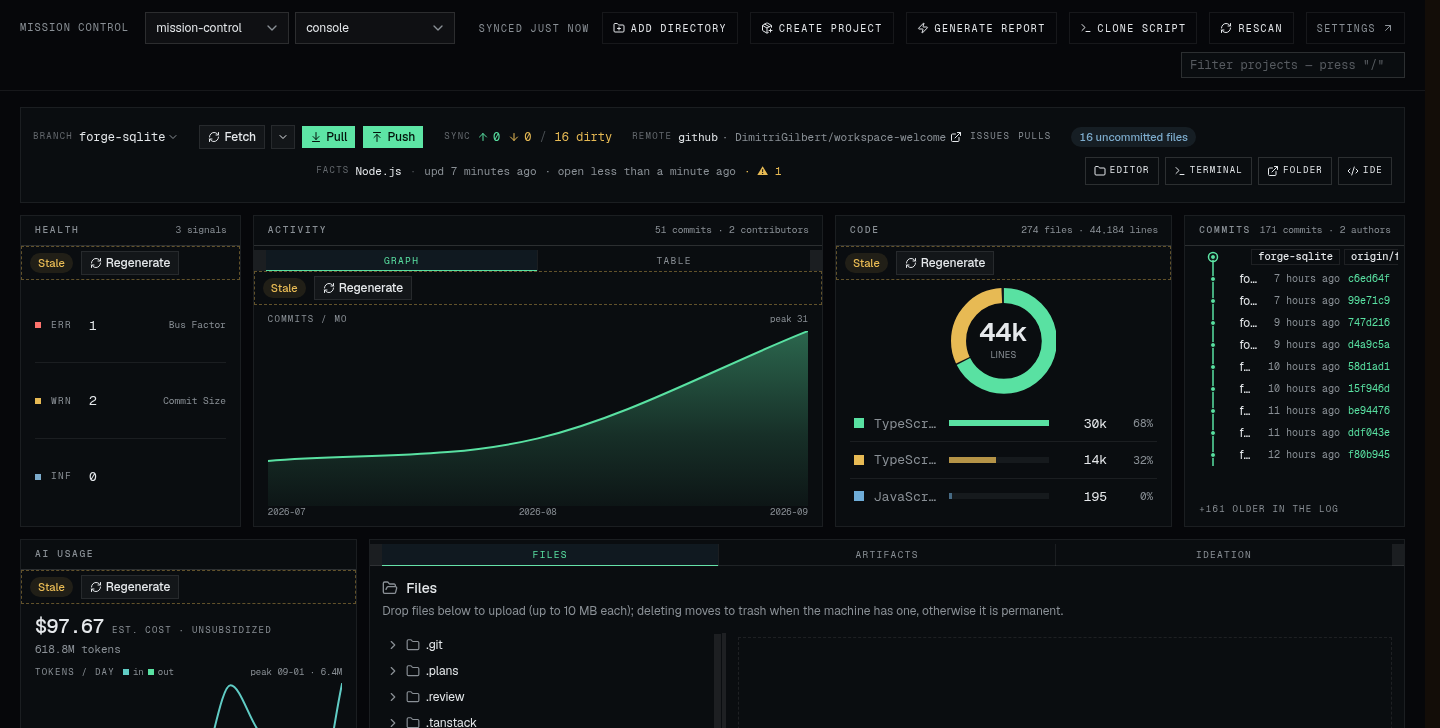
Three presets ship: bento is a mosaic with a workspace pulse, meadow lays workspace digests on a daylight ground, mission-control is a fleet ledger with a triage panel. Each carries a light and a dark scheme, and the masthead picker remembers your choice.
New panels land over releases and the shaping controls keep deepening.
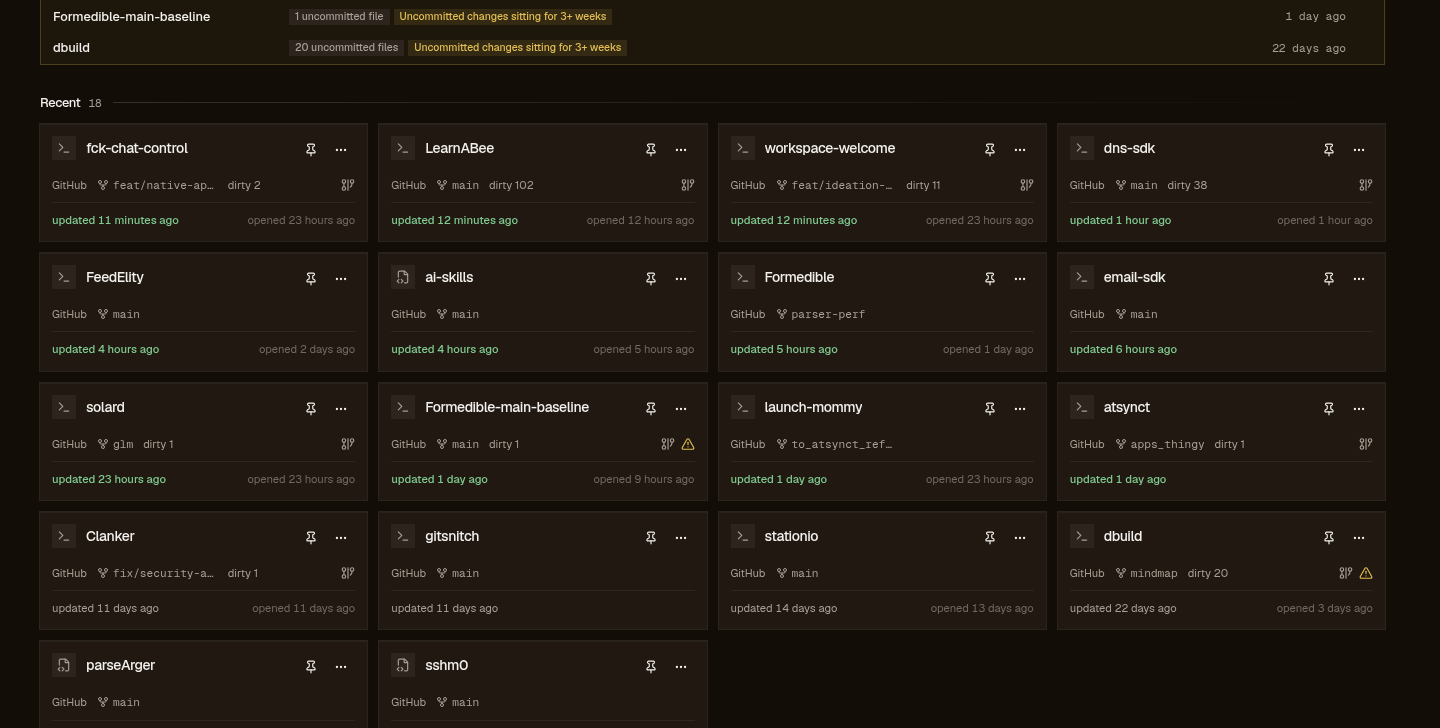 mission-control
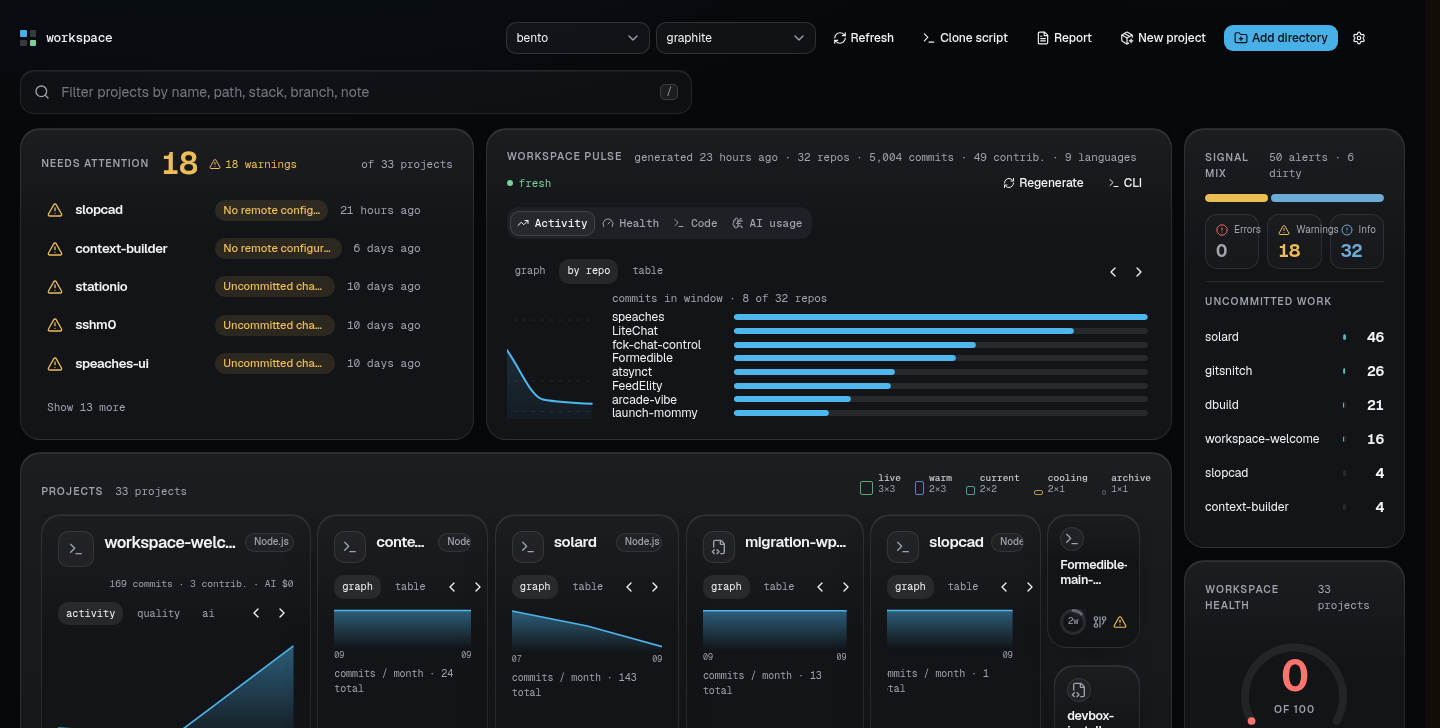 bento
bento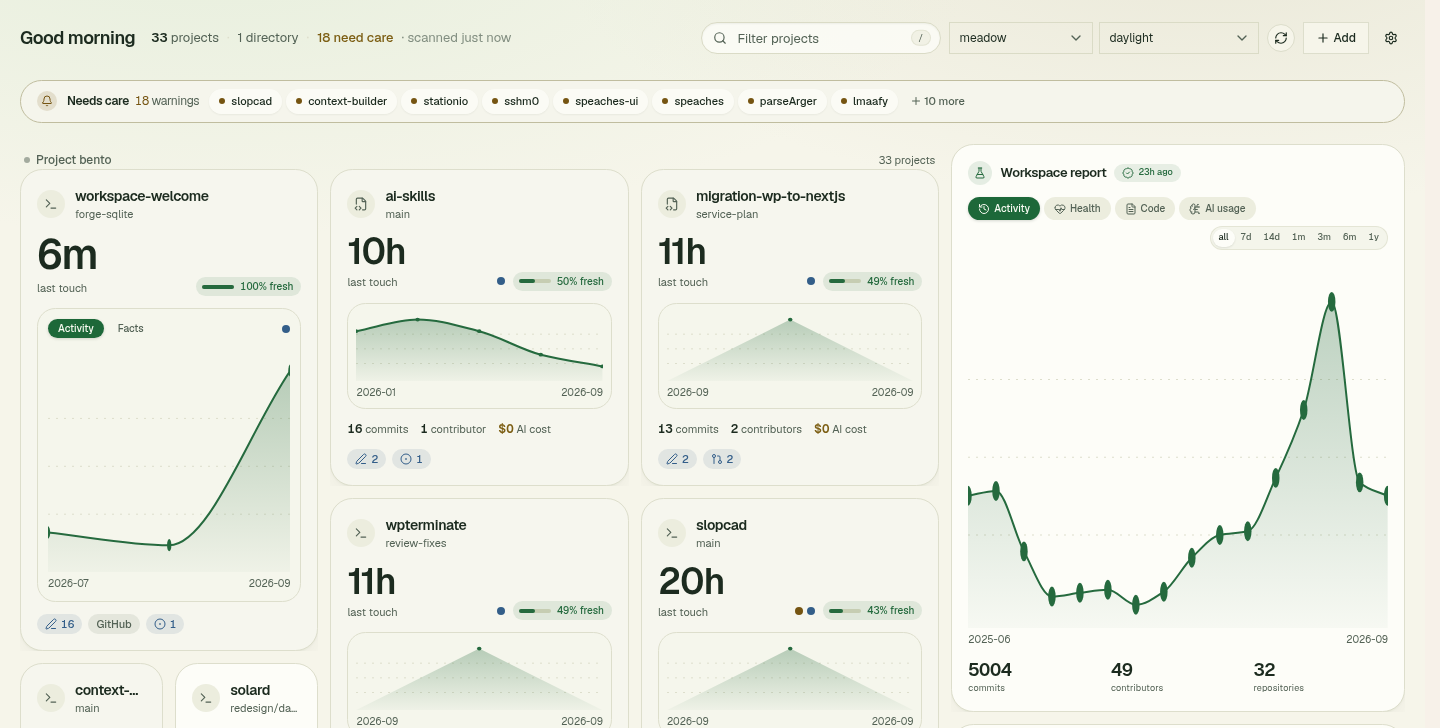 meadow
The forge layer
A project's git remote names its forge, the code host it lives on. The remote URL is parsed into a host and an owner/repo slug that links the local directory to a repository. Today the only forge is GitHub, reached through your own gh CLI. The adapter contract (CLI or HTTP style) is built so Gitea and GitLab can slot in without reshaping anything, and an unsupported host renders an honest “GitHub only for now”, never a broken panel.
Forge sync is the only network call and it is user-triggered: no polling, no fetch-on-load. Each call passes server-side guards in order (a five-minute minimum interval per repo, in-flight dedupe, a process-wide queue so exactly one fetch runs at a time) plus an gh auth status probe, cached ten minutes, that refuses honestly when the CLI isn't logged in.
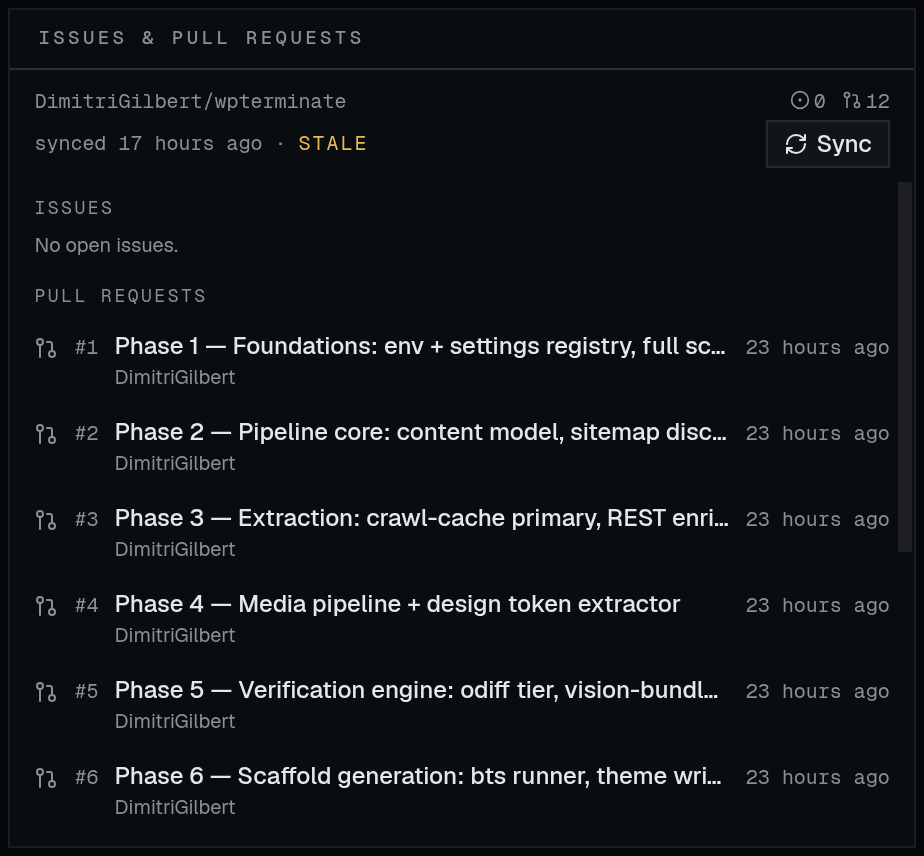
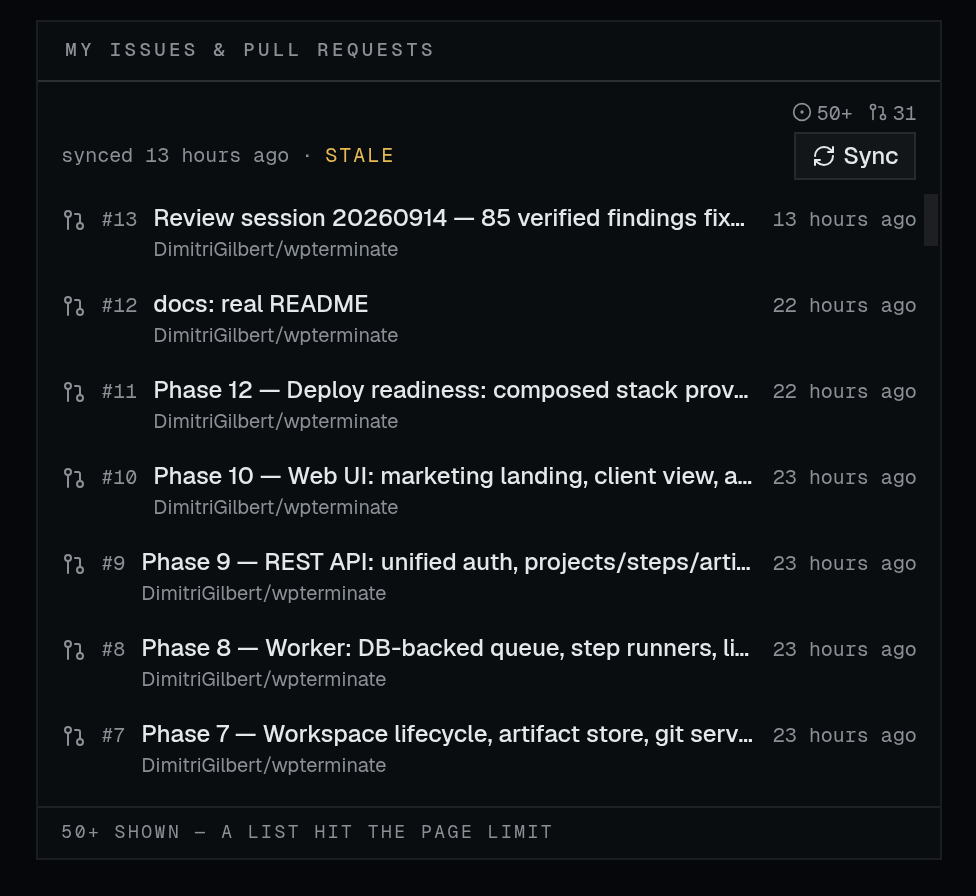
A successful sync writes a forge snapshot: the repo's open issues and PRs as of that moment, cached in sqlite with no history; the next sync replaces it. Every read is a database read, so rendering can never stall on the network or spend your rate limit.
The honesty rules are strict: a list that hit the 50-per-page cap renders 50+, never a fabricated exact count; a failed first sync leaves the board in a Never synced state with the Sync button; a failed re-sync keeps the last good snapshot and shows the error; anything older than an hour is stamped stale, a hint rather than a fetch trigger.
The feed is the cross-repo sibling: your open issues and PRs across every GitHub repository, workspace or not, with owner/repo attribution on every row. Chips beside project names show the cached counts, and a project board with no snapshot of its own falls back to your feed items for that slug, labeled as such and upgradeable to full totals with a sync.
git-snitch reports
A report is a self-contained HTML file produced by git-snitch, a separate CLI the app spawns for you. Two kinds: a project report for one repo, and a root report, a comparative scan of every repo under a root. The app resolves the command from Settings, falls back to a local build, then to npx; the run streams progress from the generator's stderr while you watch.
Finished files cache under $XDG_CACHE_HOME/workspace-welcome/reports/ and are served at /reports/<key>, so a report opens in a new tab from any machine that can reach the app. Regenerating a key overwrites it; reports are a cache, not an archive. The boards embed its digests (activity, health, code mix, AI usage), so the numbers on the dashboard and the page behind them come from the same run:
The project surface
Opening a project swaps the bird's-eye view for the workbench. The file browser lists the project lazily and handles upload (10 MB per file), rename, new folder, download, and delete. Deletion goes to the trash via gio when the machine has it, otherwise it is permanent behind the same confirmation. The browser is confined to the project subtree: the server rejects path escapes (ADR-0002).
Artifact folders are per-project paths where build and test media land: screenshots, videos. Configure them on the Artifacts tab and the viewer streams the files with HTTP range support, so video seeking works. They are media outputs, distinct from ideation's documents.
Ideation is the AI interview: it grills an idea one question at a time, then generates a PRD and an implementation plan into the project's docs/. Steps can fan out over several models with a reconciler merging and grading the candidates; every session persists under .ideadump/ in the project, so it travels with the repo and survives restarts. Models are picked in Settings and frozen into each session when it starts.
The IDE server is one shared code-server child process, spawned on demand the first time you press Open IDE (auto-installed into the app data dir) and stopped from Settings. Opening a specific project deep-links the shared instance with ?folder=, one server for many projects (ADRs 0003/0004).
Where it all lands
Everything above reads your filesystem; what the app itself remembers sits in one embedded sqlite database (WAL, no server) under the XDG data dir, migrated and imported per ADR-0006. The full path map, what each settings knob does, and the trust boundary (what talks to the network and what never does) are on Settings & data.
Reference
Every term, one line each, in walking order:
- Root
- A configured directory whose immediate subdirectories become projects. Edited in Settings, stored in sqlite.
- Project
- One scanned subdirectory of a root: dates, stack, git state, alerts, plus your overrides (pin / note / hide / last-opened).
- Scan
- The cached pass over all roots. Fingerprints decide which projects get re-read; overrides re-merge on every call without a rescan.
- Board
- One dashboard preset (bento, meadow, or mission-control): a movable widget grid with a light and a dark scheme each.
- Forge
- A code-hosting backend. GitHub today, through your gh CLI; the adapter contract leaves room for Gitea and GitLab.
- Forge sync
- The explicit, user-triggered fetch behind every Sync button. Min-interval, dedupe, one sequential queue; nothing auto-syncs.
- Forge snapshot
- A repo's open issues/PRs as of the last sync, cached in sqlite. Reads are DB-only; a capped list renders 50+.
- Feed
- The dashboard's cross-repo board: your open GitHub items across every repository, workspace or not.
- Report
- A self-contained git-snitch HTML file for one repo or a whole root. Served at /reports/<key>, cached under XDG.
- File browser
- Per-project lazy listing with upload / rename / delete / new folder / download. Confined to the project subtree.
- Artifact folders
- Per-project folders where build/test screenshots and videos land; the Artifacts tab configures and streams them.
- Ideation
- The per-project AI interview: grilling, PRD, plan, sessions persisted in the project under .ideadump/.
- IDE server
- One shared code-server child process, spawned on demand, deep-linked per project with ?folder=.