Settings & data
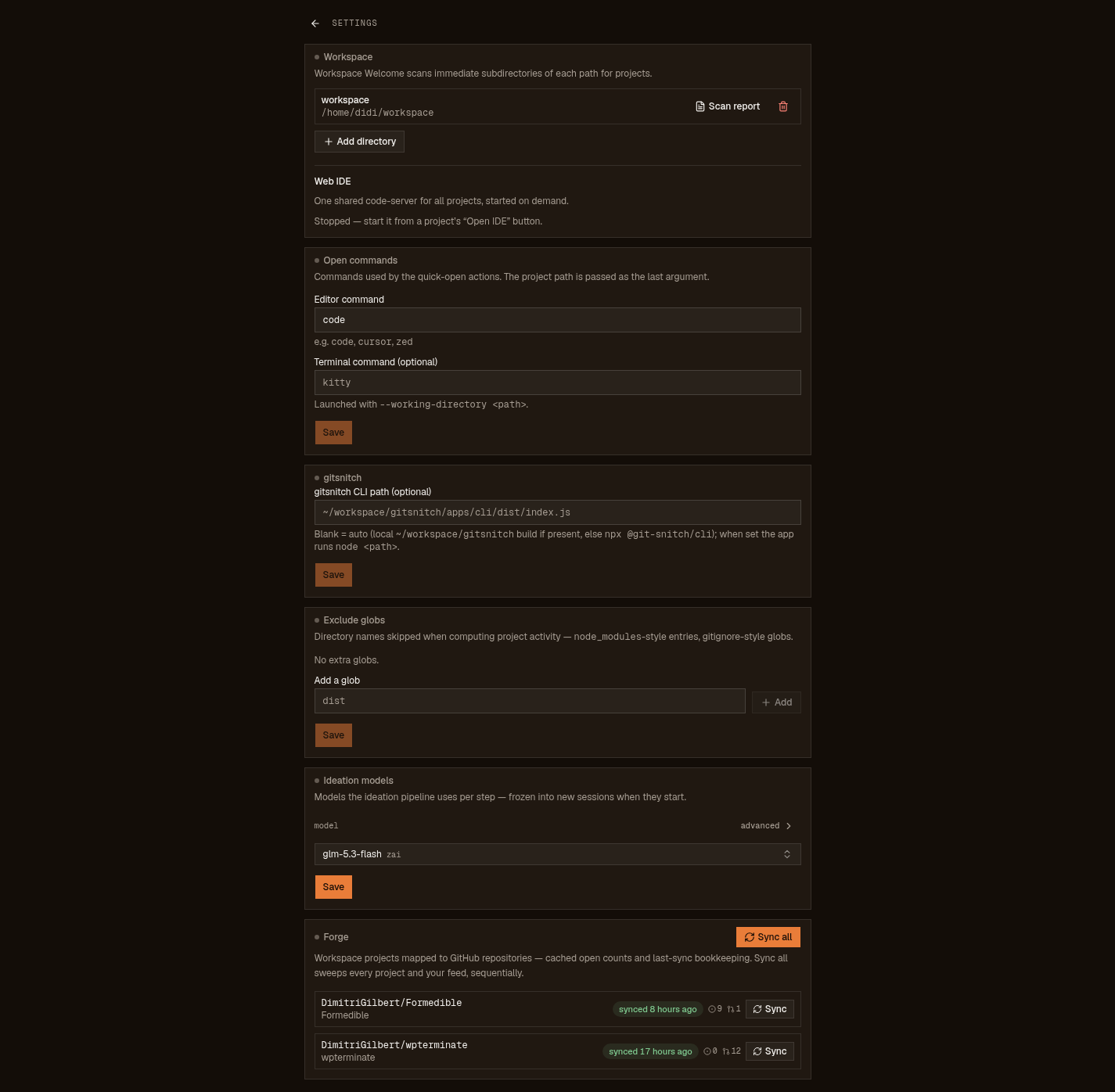
Seven knobs in the UI, five paths on disk. The tour below follows the settings page top to bottom; if it isn't here, the app doesn't have that knob.
The seven sections
- Workspace
- Your roots: add or remove tracked directories, run a per-root comparative scan report, restore hidden projects (the restore list only appears when something is hidden). Removing a root drops the overrides pinned under it.
- Web IDE
- Status and stop for the one shared code-server instance. Started on demand from a project's Open IDE button; first use downloads code-server (~100–200 MB, once).
- Open commands
- Which editor and terminal the quick-open buttons launch. The project path is passed as the last argument; the terminal is launched with --working-directory. Leave the terminal blank and the app picks the first of the common Linux terminals it finds (konsole, gnome-terminal, kitty, alacritty, …).
- git-snitch CLI path
- Where the report generator lives. Blank means auto: a local gitsnitch build if one exists, otherwise npx. When set, the app runs node <path>.
- Exclude globs
- Directory names the scan skips when computing a project's activity date: node_modules-style entries, gitignore-style globs. Use it so a fat build folder can't make a dead repo look alive.
- Ideation models
- The models the ideation interview uses per step. Changes are frozen into new sessions when they start; a running interview keeps the models it began with.
- Forge
- The register of every mapped project↔repo link: cached open counts, last-sync time, per-repo Sync, and Sync all (which sweeps every project and your feed, sequentially). The only place the app talks to GitHub, and only on a button.
On disk
| What | Where |
|---|---|
| Everything persisted: roots, pins, notes, hides, open commands, artifact folders, settings, forge snapshots, your feed | $XDG_DATA_HOME/workspace-welcome/workspace-welcome.db |
| Legacy JSON config: imported once on first boot, never written again; stays as an untouched backup | $XDG_CONFIG_HOME/workspace-welcome/store.json + per-project JSON under $XDG_DATA_HOME/workspace-welcome/projects/ |
| Report HTML cache: disposable, deterministically re-creatable | $XDG_CACHE_HOME/workspace-welcome/reports/ |
| code-server install for the browser IDE | $XDG_DATA_HOME/workspace-welcome/ide/ |
| The app itself | ~/.local/share/workspace-welcome/app (previous version kept at app.bak for rollback) |
On most Linux boxes the data dir is ~/.local/share and the cache is ~/.cache. The store is an embedded sqlite database (transactional writes, WAL journal, no server to run), so a backup is: stop the service, copy the .db file (plus its -wal sidecar if present), start it again. Step 9 of getting started covers upgrade and rollback semantics.
Trust boundary
What talks to the network, exhaustively: the forge sync (an explicit, read-only fetch through your own gh CLI, only when you press Sync) and the two on-demand downloads (release upgrades, the code-server install). Everything else is local: scans shell out to git, reads never leave the sqlite file, reports render from cache.
The app is fine on localhost or a trusted LAN. The IDE runs with --auth none, file routes reject path escapes, and the file browser is confined to project subtrees, but none of that makes it a fortress. It is a tool for your network; do not hang it on the public internet and walk away.