What it does
Knowing your folder
A root is a folder you register; its immediate subdirectories become the projects. The scan builds each project's record: filesystem dates, a stack guess from the manifest files, and for git repos the branch, ahead/behind, dirty count, last commit, and remote, with deep links for GitHub, GitLab, Bitbucket, Codeberg, and sourcehut.
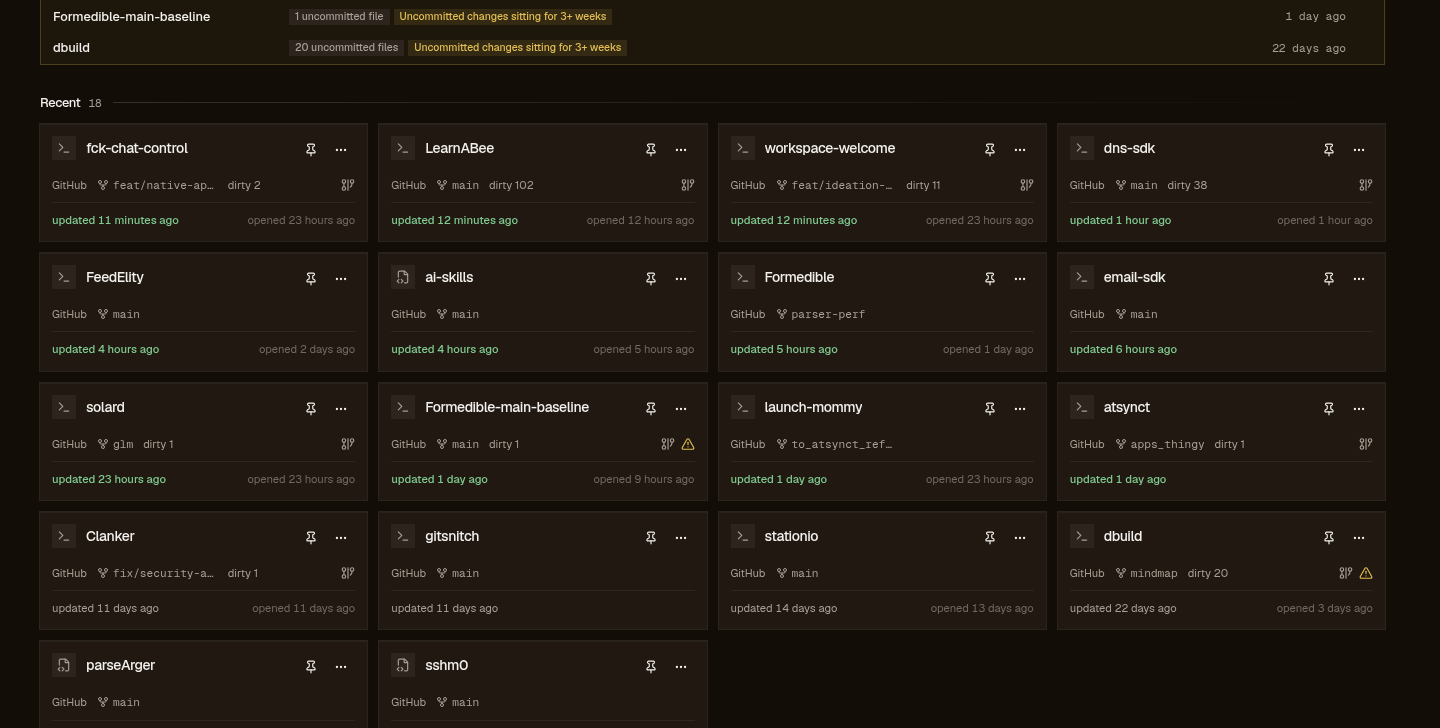
Health falls out of that state: seven alerts ( ERR diverged; WRN no-remote and stale-wip; INF behind, unpushed, dirty, dormant) rolling into an attention surface that folds away when empty. Recency rides under them: an LED per project cooling over roughly 90 days. Press / to filter across name, path, stack, branch, remote, or your own note.
Warm rescans skip what didn't move: the per-project fingerprint decides who gets re-read. Overrides (pin, note, hide, last-opened) re-merge on every read without a rescan, and they live in the app's database, never in your repos.
Your forge work
The chips beside a project's git state, cached counts labeled with where they came from:
A project's remote names its forge, host plus owner/repo from the URL. GitHub is the one wired today, through the gh CLI you already have; the adapter contract is shaped for Gitea and GitLab to slot in, and an unsupported host says “GitHub only for now” instead of rendering a broken panel.
Sync is a button, and the server enforces guards on it: a five-minute minimum interval per repo, in-flight dedupe, one process-wide fetch queue, and an gh auth status probe that refuses honestly when the CLI isn't logged in. A successful sync writes a snapshot (open issues and PRs, no history, the next sync replaces it) and every read afterwards is a database read.
Unsynced shows Never synced, a failed re-sync keeps the last good snapshot and surfaces the error, and data older than an hour is stamped stale. The feed is the account-level view: your open items across every GitHub repository, workspace or not.
The board is your space
The dashboard is a grid you shape. Every panel drags, resizes, and sheds; the arrangement persists. You can strip it to one panel or let it sprawl.
Three presets ship: bento is a mosaic with the workspace pulse, meadow lays digests on a daylight ground, mission-control is a fleet ledger with a triage panel. Each carries a light and a dark scheme, and the masthead picker remembers your choice; the picker above re-skins this site with the app's own tokens.
New panels land release over release and the shaping controls keep deepening.
Project pages
Open a project and the board gives way to the workbench: a note field for where you left off, git fetch / pull ff-only / push, a branch switcher that probes before it clobbers, read-only commit history, remote deep links, and quick-open for your editor, terminal, or folder. The terminal auto-detects common Linux terminals if you leave it unconfigured.
Three tabs cover the rest. files: a lazy browser confined to the project subtree (the server rejects ../ escapes), with upload (10 MB a file), rename, download, and delete-to-trash via gio when it's there. artifacts: build and test screenshots and videos, from folders you configure on that tab, streamed with range support so video seeking works. ideation: an AI interview that grills an idea one question at a time, then writes a PRD and an implementation plan into the project's docs/, the session persisted under .ideadump/ so it travels with the repo.
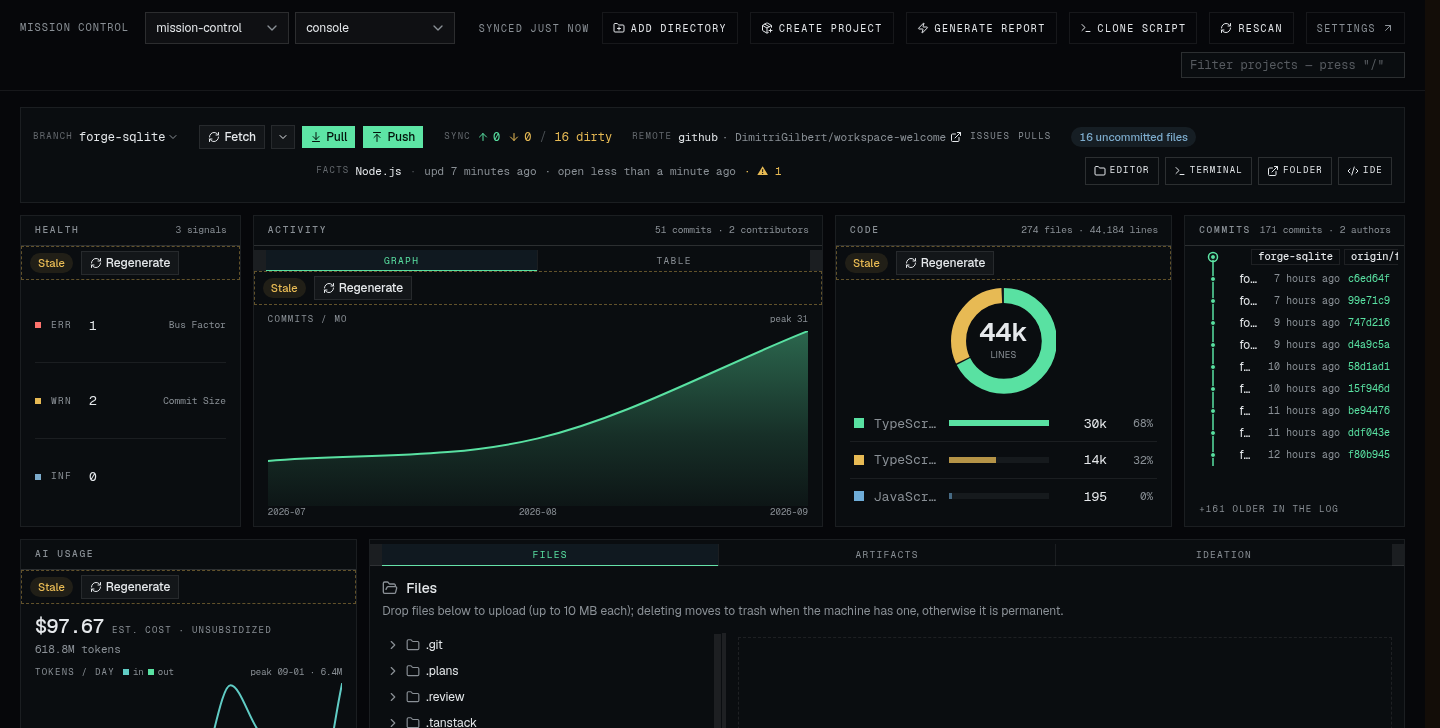
Confined file browser, the server rejects path escapes
Reports, IDE, new projects
Reports. git-snitch is a separate CLI the app spawns for you: a report for one repo from the project page, or a comparative scan across a whole root from Settings. The output is a self-contained HTML file cached under XDG and served at /reports/<key>, open in a new tab from any machine that can reach the app. The boards embed its digests (activity, health, code mix, AI usage) and the command resolves Settings path, then a local build, then npx.
Browser IDE. Open IDE starts one shared code-server instance, deep-linked per project with ?folder=, one server for many projects. First use installs it (~100–200 MB, once) into the app data dir; stop it from Settings. It runs --auth none: fine on localhost or a trusted LAN, not something to hang on the public internet.
New projects. Create project scaffolds a better-t-stack app into a chosen root with compatibility-aware stack lists, live progress, optional install, and an AGENTS.md when the project doesn't have one. Clone script goes the other way: a portable bash script from your selected remotes, SSH forced, existing dirs skipped, dupes deduped. You run it on the next machine; the app never clones for you.
#!/usr/bin/env bash
# 12 repos · 2026-09-14 · forces SSH.
set -euo pipefail

cloned=0; skipped=0

if [ -d "wpterminate" ]; then
  echo "skip   wpterminate (already exists)"
  skipped=$((skipped + 1))
else
  echo "clone  wpterminate"
  git clone "git@github.com:DimitriGilbert/wpterminate.git"
  cloned=$((cloned + 1))
fi

echo "---"
echo "done: $cloned cloned, $skipped skipped"